FORMULER IPTV SETUP GUIDE

Set Up KING TV On Formuler And MYTVOnline

Use this guide for Formuler Z, GTV and other supported models. Keep your KING TV activation email open and choose the login method that matches the details you received.

Large readable steps
MYTVOnline instructions
Support available 24/7
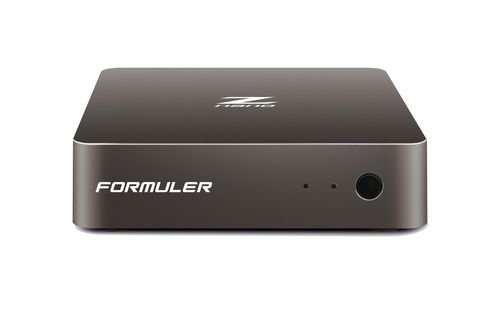
FORMULER DEVICE
Entering the KING TV portal URL in MYTVOnline
MYTVOnline 1
MYTVOnline 2
MYTVOnline 3
Use the details from your activation email
Most Formuler devices use a portal URL with a Formuler MAC or Device ID. Some accounts use username, password and server details instead.
BEFORE YOU OPEN MYTVONLINE

Keep These Four Things Ready

Most setup problems are caused by using the wrong login method, entering the wrong device ID or missing part of the portal address.

1

Your Formuler Box

Connect the device to the television and internet. Ethernet is recommended when practical.

2

Your Activation Email

Keep the KING TV email open on a phone, tablet or computer so every detail can be copied exactly.

3

Your Remote Control

You will need the arrow, OK, back and keyboard controls while entering the service details.

4

Your Device ID Or MAC

Formuler may display a MAC address, Device ID or both. Use the value requested by KING TV support.

Already ordered?
Reply to the KING TV order confirmation email if support asks for the Formuler MAC address or Device ID. Do not send a television serial number or Wi-Fi password.

MATCH THE DETAILS IN YOUR EMAIL

Choose The Correct Connection Type

Do not mix portal details with username and password details. Choose the card that matches your KING TV activation email.

XTREAM CODES LOGIN

Username, Password And Server

Choose this only when the email contains all three values. Do not paste these details into a portal field.

Use Username Login
ANDROID APP OPTION

IPTV PRO Where Supported

Some Formuler Android models can install normal player apps. IPTV PRO is the priority alternative when your email contains username, password and server details.

Open IPTV PRO Guide
OPEN THE APP ON YOUR DEVICE

Use The Instructions For Your MYTVOnline Version

The wording and layout can vary slightly, but the same service details are used on each supported version.

OLDER MODELS

MYTVOnline 1

Open MYTVOnline, choose Edit Service or Add Portal, then enter a service nickname and portal URL.

NEWER MODELS

MYTVOnline 3

Open Content Manager or Connections, add a new portal or Xtream Codes service and follow the matching steps below.

Cannot find the same menu name?
Look for Connections, Content Manager, Add Portal, Add Service or Edit Service. Formuler changes labels between models and MYTVOnline versions.

PORTAL SETUP

Add The KING TV Portal In MYTVOnline

Use this section when the activation email contains a portal URL and support has registered your Formuler MAC address or Device ID.

1

Open MYTVOnline

Launch the MYTVOnline app from the Formuler home screen.

2

Open Connections Or Edit Service

Choose Connections, Add Portal, Add New Service or Edit Service depending on the version shown.

3

Enter A Service Nickname

Use KING TV or another short name that is easy to recognise.

4

Enter The Complete Portal URL

Copy the full address from the activation email. Include http:// or https://, any port and the final path.

5

Save The Connection

Select Connect, Save or OK. Remove spaces before and after the portal URL.

MYTVOnline
ADD PORTAL
Portal nickname
KING TV
Portal URL
http://example.link/c/
Login required
Use the option shown by your email
CONNECT
Example only
Do not use the sample portal above. Enter the unique address supplied for your KING TV account.
DEVICE REGISTRATION

Find And Send The Formuler MAC Or Device ID

The correct value is normally shown inside MYTVOnline, the device information menu or on the label underneath the box.

1

Open Device Information

Check Settings, About, Device Information or MYTVOnline Connections.

2

Look For MAC, ID Or Device ID

Formuler may show several identifiers. Use the one requested by KING TV support.

3

Reply To Your Order Email

Send the complete value exactly as displayed. A clear photo or screenshot helps prevent mistakes.

EXAMPLE FORMAT
00:1A:79:12:34:56
Your real Formuler identifier will be different. Never copy this example.
Entering the KING TV portal URL in MYTVOnline

Use the identifier requested by support
Some Formuler models display a device ID, wired MAC, Wi-Fi MAC and MYTVOnline ID. Do not guess between them.

USERNAME AND PASSWORD LOGIN

Use Xtream Codes Only When Your Email Supplies It

This login method requires a server address, username and password. All three values must come from the same KING TV activation email.

MYTVOnline
XTREAM CODES
Playlist name
KING TV
Server address
Enter the server from your email
Username
Enter exactly as supplied
Password
Check capital letters and numbers
LOGIN
1

Add A New Xtream Codes Connection

Open Connections or Content Manager and choose Xtream Codes, API Login or XC Login.

2

Enter The Server Address

Include http:// or https:// and any port number shown in the activation email.

3

Enter Username And Password

Copy both values exactly. Do not add spaces before or after them.

4

Save And Connect

Wait for MYTVOnline to load categories and channel information before opening a stream.

Prefer a normal Android player?
When your Formuler model supports standard Android apps, IPTV PRO is the priority alternative for username, password and server logins.

FIRST CONNECTION

Wait For MYTVOnline To Load The Service

The first connection can take longer while the app downloads categories, guide information and account data.

1

Connecting

Leave the loading screen open and avoid repeatedly pressing remote buttons.

2

Successful Connection

When the service connects, MYTVOnline will begin loading groups and channel information.

3

Refresh The List

If the interface opens with no content, close MYTVOnline, restart the box and open the app again.

4

Open A Channel

Select a category and test one channel before changing any additional playback settings.

Still showing no channels?
Confirm that the account is active, the login details match the email and the correct Formuler identifier has been registered.

USE THE CORRECT FIX

Solve Formuler Problems Without Starting Again

Check the matching problem before deleting the connection or resetting the device.

PORTAL NOT CONNECTING

Check The Full Address

Confirm the complete portal URL, including http:// or https://, any port and the final path.

DEVICE NOT AUTHORISED

Verify The Device ID

Send support a clear photo of the MAC address or Device ID displayed inside the Formuler menus.

LOGIN FAILED

Do Not Mix Login Types

Portal details and Xtream Codes details use different connection screens. Return to the matching section above.

BUFFERING OR FREEZING

Restart The Network

Restart the Formuler box and router. Use Ethernet where practical and test another channel.

WORKS ON HOTSPOT

Check The Home Connection

If the service works through a mobile hotspot but not home internet, open the KING TV connection help page.

Open Connection Help
APP OR DEVICE PROBLEM

Update Before Resetting

Install official Formuler and MYTVOnline updates. Do not factory reset the device as the first troubleshooting step.

Contact Support

Do not share your password publicly.
Send account information only through the KING TV contact page or by replying to your official order email.

FORMULER SETUP QUESTIONS

Formuler And MYTVOnline FAQ

Open a question to view the answer.

Which MYTVOnline version should I use?

Use the MYTVOnline version already installed for your Formuler model. The menu names vary, but each version supports a portal or another compatible connection type.

Should I choose portal or Xtream Codes?

Choose the option that matches the KING TV activation email. A portal login uses a portal URL and normally a registered device ID. Xtream Codes uses a server address, username and password.

Where can I find the Formuler MAC address or Device ID?

Check MYTVOnline Connections, Device Information, Settings, About or the label underneath the box. Send support the exact identifier requested.

Why does MYTVOnline say the device is not authorised?

The registered device identifier may not match the box. Reply to your order email with a clear photo or screenshot of the ID shown by the device.

Can I use IPTV PRO on a Formuler box?

Some Formuler models support normal Android apps. IPTV PRO is the priority alternative when your activation email contains username, password and server details.

Why is MYTVOnline not loading any channels?

Confirm the account is active, verify the login details, restart the box and router and allow the first connection enough time to download the service information.

Should I factory reset the Formuler box?

No. Do not factory reset as the first fix because it removes saved settings. Contact support before resetting or changing firmware.

Does KING TV renew the subscription automatically?

No. KING TV subscriptions are manually renewed. No automatic renewal charge is taken.

STILL NOT CONNECTING?

Send Your Formuler Model, MYTVOnline Version And Error Screen

Include the exact Formuler model, the MYTVOnline version, a photo of the error and the login type shown in your activation email. This helps support identify the correct fix faster.