SS IPTV SMART TV GUIDE

Add Your KING TV Playlist To SS IPTV

Use SS IPTV when the application is available on your television and your activation email contains a complete M3U playlist link. Generate a connection code in the app, then add the playlist through the official SS IPTV editor on a phone or computer.

M3U playlist setupConnection code methodSupport available 24/7
M3U PLAYER
SS IPTV
Use a second device for the editorKeep the television on SS IPTV while entering the connection code and playlist on your phone, tablet or computer.
CHECK YOUR LOGIN TYPE

SS IPTV Needs A Complete M3U Link

Do not use this guide for a portal URL or a username-only login.

USE ANOTHER APP

Server, Username And Password

Use IPTV Smarters or IPTV PRO when the email contains three separate login fields.

Open Smarters Guide
USE A PORTAL GUIDE

Portal URL And MAC

Use Smart STB or a MAG-style guide when the email contains a portal URL and MAC instructions.

Open Smart STB Guide
Never type your M3U link into a public messageThe link contains account information. Paste it only into the official SS IPTV editor or send it privately to KING TV support.
STEP 1

Install SS IPTV And Get A Connection Code

The menu names may differ slightly by television model and app version.

1

Open The TV App Store

Search for SS IPTV. Install the official application when it is available for the television.

2

Open SS IPTV

Allow the first start to complete, then open Settings using the gear icon.

3

Open General

Find the General section or the page containing Get Code or Connection Code.

4

Select Get Code

Write down the temporary connection code exactly and leave the app open.

STEP 2

Add The Playlist Through The Official Editor

Use a phone, tablet or computer because the M3U URL is easier to paste there.

1

Open The Playlist Editor

Visit the official SS IPTV playlist editor in a web browser.

Open SS IPTV Editor
2

Enter The Connection Code

Type the code displayed by the television and select Add Device.

3

Open External Playlists

Select External Playlists, then Add Item or Add Playlist.

4

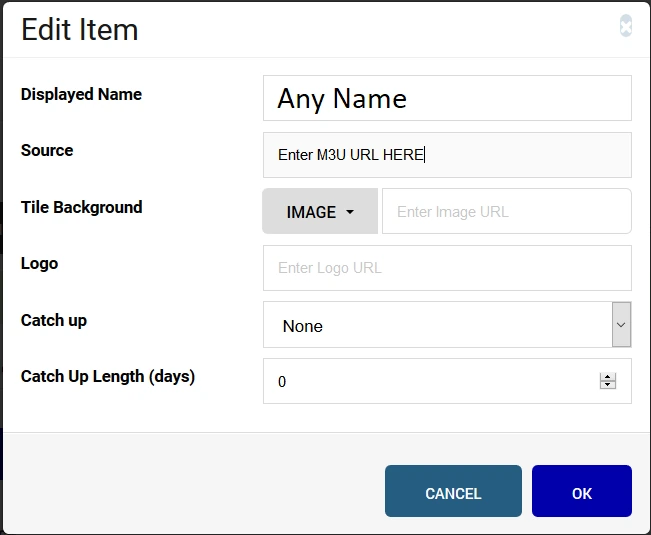
Enter A Display Name

Use KING TV or another short name you will recognise on the television.

5

Paste The M3U URL

Paste the complete playlist address into the Source field. Do not shorten or edit it.

6

Save And Refresh

Save the editor changes, return to SS IPTV and refresh or restart the application.

Wait for the categories to appearLarge playlists can take time to load on an older television. Avoid adding the same playlist repeatedly.
SS IPTV TROUBLESHOOTING

Fix The Matching Problem

Do not factory reset the television before checking these items.

CODE REJECTED

Generate A New Code

Return to SS IPTV, request a fresh connection code and enter it without spaces.

EMPTY PLAYLIST

Check The Complete M3U URL

Confirm the full playlist address was saved in Source and restart the app.

APP NOT AVAILABLE

Choose Another Smart TV App

App availability depends on television model, software and country. Open the Smart TV guide for alternatives.

Open Smart TV Guide
SLOW LOADING

Restart And Reduce The List

Restart the television and router. Ask support to remove unneeded countries if an older television cannot handle the full list.

WORKS ON HOTSPOT

Check The Home Network

Open the connection help page when the same playlist works through another network.

Open Connection Help
STILL NOT WORKING

Send The TV And App Details

Include the television model, SS IPTV screen and exact error. Do not post the M3U URL publicly.

Contact Support
SS IPTV QUESTIONS

SS IPTV Setup FAQ

Open a question to view the answer.

What information does SS IPTV need?

It normally needs a complete M3U playlist URL added through the official playlist editor using a connection code from the app.

Do I need a new connection code every time?

The official editor can remain connected until the device is disconnected. Generate a new code when the existing connection no longer works.

Why is SS IPTV missing from my television store?

Availability varies by television model, software version, country and app-store policy. Choose another compatible Smart TV player.

Does the KING TV subscription include an SS IPTV app fee?

KING TV provides the service and setup details. Any third-party application fee or licence is separate.

Does KING TV renew automatically?

No. KING TV subscriptions are manually renewed. No automatic renewal charge is taken.

READY TO ADD YOUR PLAYLIST?

Generate The Code And Use The Official Editor

Keep SS IPTV open on the television while adding your KING TV M3U link from a phone, tablet or computer.

ORIGINAL SS IPTV SCREEN

Use The Picture To Check The Playlist Area

Keep SS IPTV open on the television while using the official editor on a phone or computer.

Original SS IPTV playlist screen from the KING TV guide

SS IPTV Playlist And Settings Screen

Menu names can move between versions. Look for Settings, General, Get Code and External Playlists. Never paste the M3U link into a public message.